
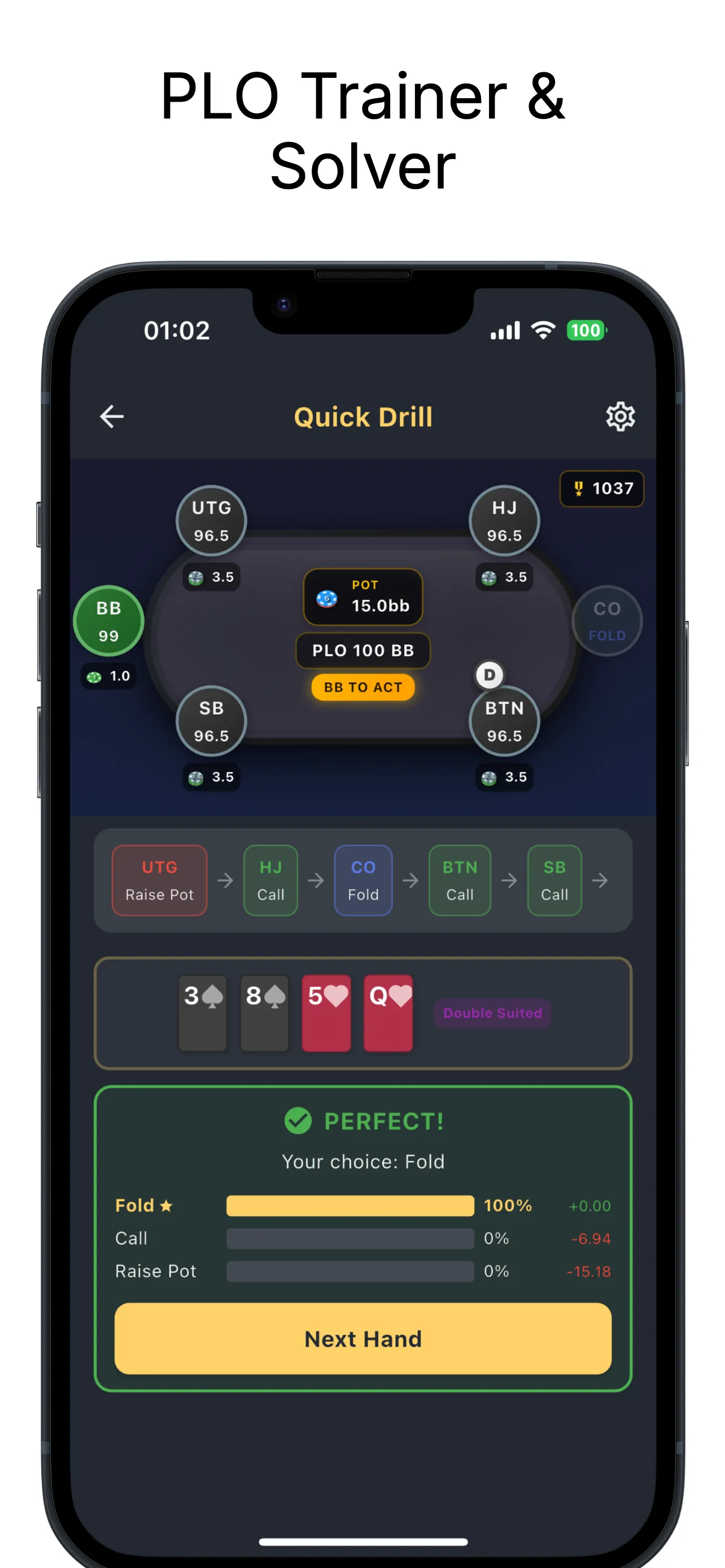
Pot Limit Omaha is growing faster than any other poker variant, yet GTO training tools for PLO remain scarce. PLO Gecko (formerly PLO Edge) is a dedicated Omaha training app built by the GTO Gecko team. It covers solver-backed preflop ranges for both 4-card and 5-card PLO, 31 structured training modules, postflop training in solver-built pots, native river solving in PLO5 full-hand drills, and a full progression system with ELO ranks and daily streaks, all on your phone.
The app is on the App Store, where it holds 4.5 stars on the US storefront as of August 2026, and on Google Play. This guide walks through every feature so you can decide if PLO Gecko fits your study routine and get the most out of it from day one.
Why PLO Needs Its Own Training App
Hold'em solvers and trainers are everywhere, but PLO is fundamentally different. Four hole cards instead of two means the number of starting hand combinations explodes from 1,326 in Hold'em to 270,725 in PLO, and 5-card PLO pushes it to 2,598,960. Suitedness alone splits into five categories (rainbow, single suited, double suited, triple suited, and monotone), each affecting playability in ways that don't exist in two-card games.
Generic poker tools can't handle this complexity properly. PLO Gecko was built from the ground up for Omaha, with solver data, training modules, and feedback systems designed specifically for four-card and five-card poker. If you want to understand how GTO strategy applies to PLO, this is where you start, and if the Omaha fundamentals are still new, our PLO strategy guide covers the ground rules.
The Preflop Range Viewer: GTO Solutions at Your Fingertips
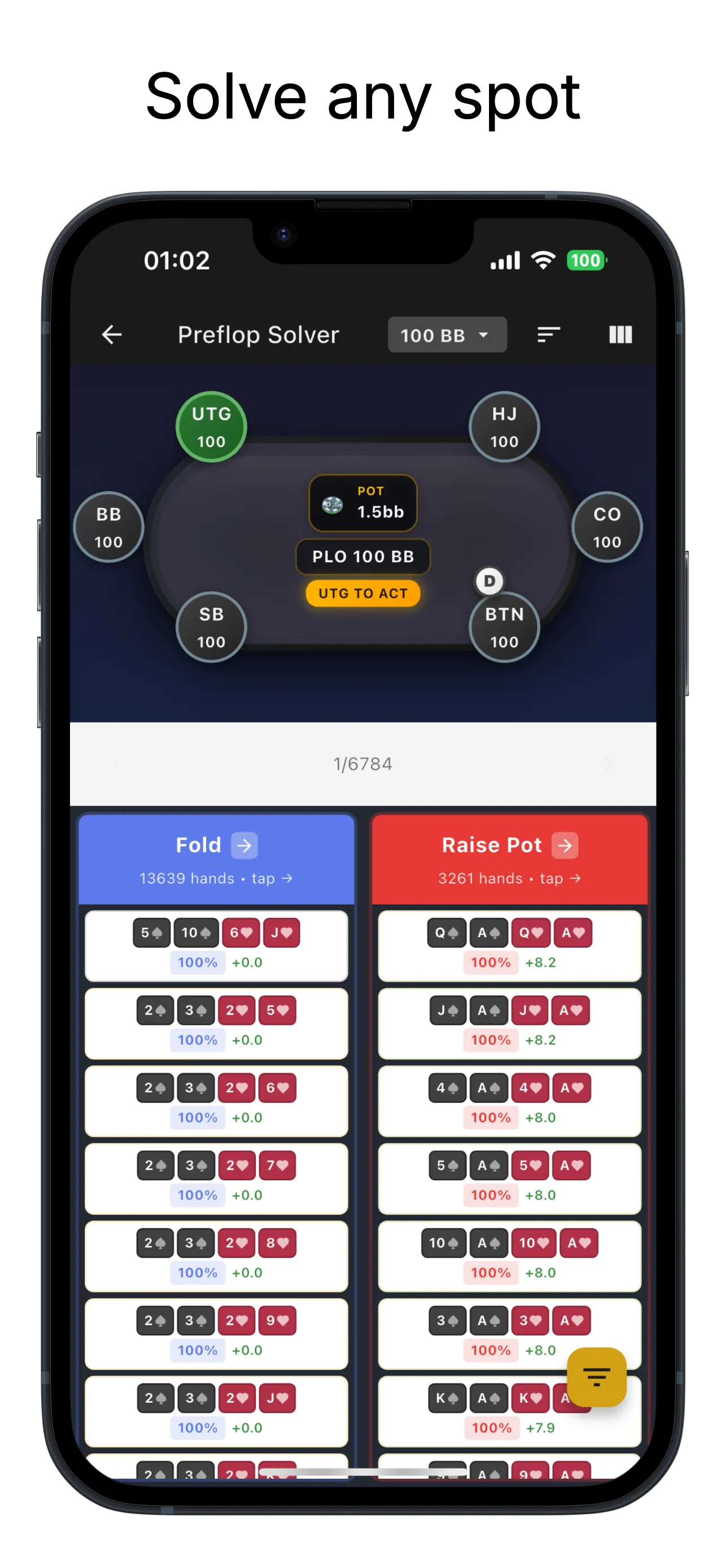
The range viewer is the foundation of PLO Gecko. It is an interactive browser for solver-backed GTO preflop ranges in both PLO4 and PLO5, showing the exact solver frequencies and EV for every hand.
Four Ways to View Ranges
You can browse ranges in four layouts:
- Grid view: a visual overview showing every hand with color-coded action frequencies
- List view: a detailed hand-by-hand breakdown with exact frequencies and EV data
- Column view: hands grouped by action for quick pattern recognition
- Matrix view: a structured overview for scanning a whole range at once
Filtering and Sorting
PLO has far too many hands to browse without filters. PLO Gecko lets you filter by hand category, by suitedness (rainbow, single suited, double suited, triple suited, or monotone), and by action, and you can sort hands by EV or by frequency.
Each hand displays the exact action frequencies and expected values, so you can see not just what to do but why, and how much EV each decision gains or loses. This is the same data-driven approach used in building and reading range charts, adapted for Omaha.
Coverage
The range viewer covers:
- All 6 positions (UTG, HJ, CO, BTN, SB, BB)
- PLO4 scenarios from raise-first-in through facing opens, 3-bet pots, 4-bet pots, squeezes, blind defense, and short-stack play
- PLO5 preflop ranges solved at 100bb
Structured Training: 31 Modules Across PLO4 and PLO5
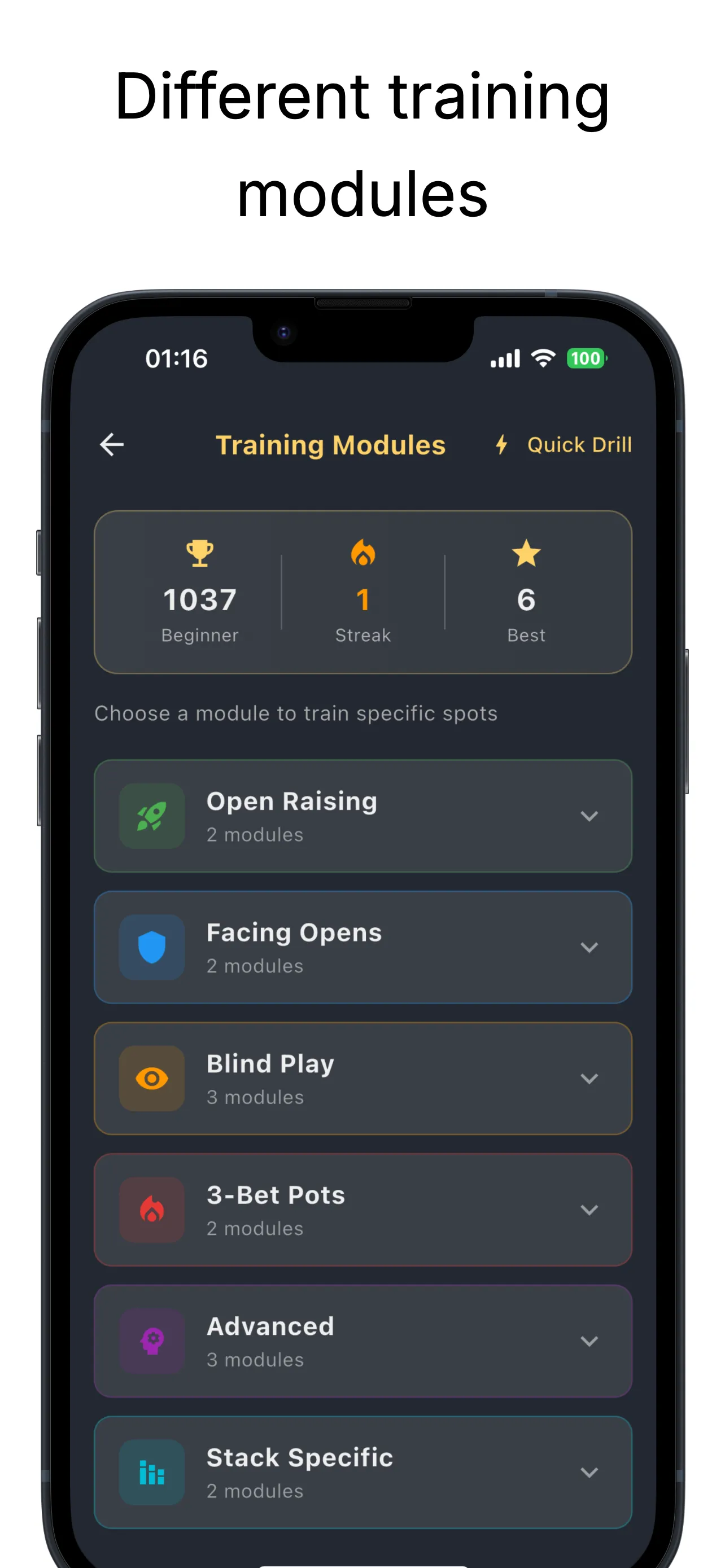
Knowing the GTO ranges is one thing. Internalizing them under pressure is another. PLO Gecko structures your training into 31 modules organized by scenario type, and 14 of them are dedicated PLO5 preflop modules.
The Scenario Families
| Scenario family | What you drill |
|---|---|
| RFI | Raise-first-in ranges from every position |
| Facing opens | Calling and raising against opens |
| 3-bet pots | 3-betting and playing against 3-bets |
| 4-bet pots | 4-betting and defending against 4-bets |
| Squeezes | Attacking an open plus callers |
| Blind defense | Small blind and big blind play against steals |
| Short-stack play | Adjustments when stacks get shallow |
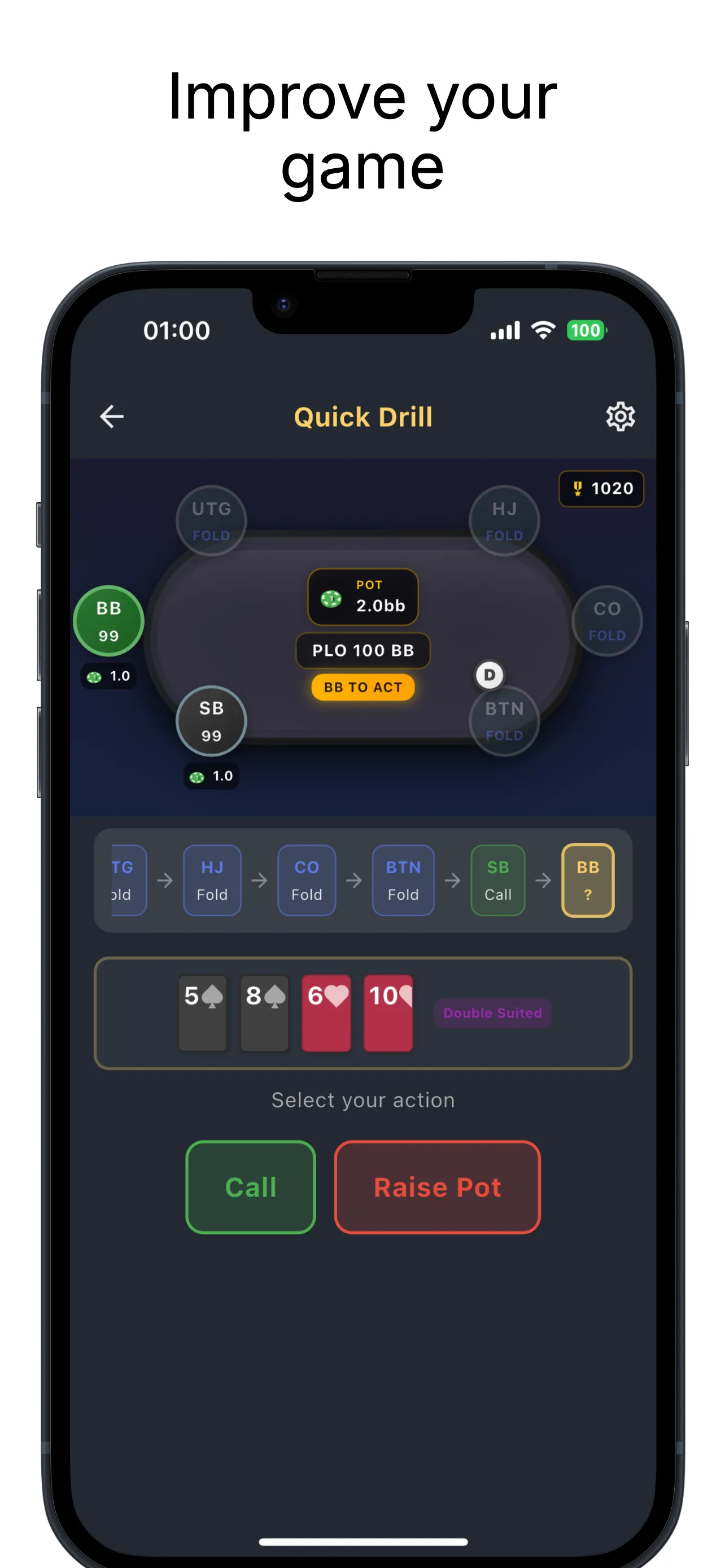
Every decision inside a module is scored against solver-based GTO frequencies and EV. Move quality is graded on a scale from perfect to blunder, you see the EV cost of each mistake, and each session ends with a grade so you know whether the range is actually sticking.
Position Drills
Position drills run across UTG, HJ, CO, BTN, SB, and BB, so you can isolate the seat that leaks the most and hammer it until the numbers move.
PLO5 Support: The Five-Card Game, Fully Trained
Version 1.3.0, released in July 2026, added full 5-card PLO support. You switch between PLO4 and PLO5 in one tap, and progress is tracked separately per variant, so your five-card stats never blur into your four-card ones. The PLO5 side includes:
- 14 dedicated PLO5 preflop modules
- Solver-backed PLO5 preflop ranges at 100bb, browsable in the range viewer with exact frequencies and EV per hand
- Native river solving on iPhone and iPad: PLO5 full-hand drills run from flop to river, and the river is solved natively on your device
- Separate progress tracking with per-variant accuracy and EV-loss trends
The five-card game punishes loose four-card habits hard, because equities compress further and the nuts arrive more often. If PLO5 is new territory, our PLO5 strategy guide covers what the fifth card changes and how to adjust.
Postflop Training: Solver-Built Pots From Flop to River
PLO postflop play is where most edges exist. With more cards and more possible draws, the decision trees are far more complex than in Hold'em. PLO Gecko trains flop, turn, and river decisions in solver-built single-raised pots, with multi-street hands that use realistic bet sizing across 14 position matchups (BB vs BTN, SB vs CO, and so on).
In PLO5, full-hand drills go a step further: the river is solved natively on iPhone and iPad, so the final street is graded by a fresh solve rather than a canned scenario. To be clear about the limit, PLO Gecko does not build custom postflop trees the way desktop solvers do. What it delivers is structured multi-street training with solver feedback on every decision.
If you are already familiar with GTO betting patterns in Hold'em, the postflop trainer helps you understand how those concepts shift in Omaha, where nut advantages change more frequently and draws are stronger.
Mixed Strategies: The RNG Dice
Many PLO preflop decisions are mixed strategies: a hand raises 65 percent of the time and folds 35 percent, for example. PLO Gecko includes RNG dice for exactly this, so you practice executing mixed strategies at the correct frequencies instead of always taking the same action with the same hand.
How Mixed Strategies Work
You hold A♠K♥J♠T♦ on the button, and the GTO strategy raises it 65 percent of the time. The RNG rolls, you map the roll to the action, and over hundreds of hands you learn to execute frequencies rather than just memorize them. That skill separates competent players from true GTO practitioners.
ELO Rating: More Than 30 Ranks
PLO Gecko tracks a chess-style ELO rating with more than 30 ranks, tracked separately for PLO4 and PLO5. The progress dashboard shows accuracy and EV-loss trends per variant, and the session history keeps hand-by-hand replays so you can revisit exactly where a session went wrong.
Achievements, Streaks, and Leak Detection
More than 60 achievements and daily streaks keep the habit alive, which matters more than it sounds: short daily sessions beat occasional marathons for range retention.
The leak detection system does the diagnostic work. It flags over-folding, passivity, and over-aggression, breaks your results down by position, pot type, hand category, and stack size, and builds a style profile that places you on the tight/loose and aggressive/passive axes. That is far more actionable than generic advice: it tells you specifically where your game diverges from optimal, similar to how understanding blockers turns vague instincts into specific folds and raises.
Theory Lessons and Quizzes
For players who prefer guided learning over pure drilling, PLO Gecko includes theory lessons with quizzes on the concepts that make Omaha its own game: PLO versus Hold'em, the nut mindset, pot-limit betting, position, and bankroll and variance. A placement quiz points you to the right starting level, which is especially useful for players transitioning from Hold'em.
Additional Tools: Equity Calculator, Wrap Analyzer, Hand Rankings
Monte Carlo Equity Calculator
Calculate Omaha equities with Monte Carlo simulation. Equity shifts more dramatically in four-card and five-card poker than in Hold'em, so having a dedicated calculator matters.
Wrap Analyzer
Wraps are straight draws unique to Omaha where multiple cards work together. A big wrap can carry more equity than a flush draw. The wrap analyzer breaks down your straight draw possibilities and grades your nut outs, a skill directly relevant to understanding outs and odds in Omaha.
Hand Ranking Lookup
Look up where any starting hand ranks. It is a fast way to calibrate your intuition about which holdings are actually premium and which only look it.
Platforms and Languages
PLO Gecko runs on iPhone, iPad, and Android, and supports more than 65 languages. It is an educational app: there is no real-money gambling and no poker table gameplay, just training.
Free Tier vs Premium
The free tier includes 25 free training hands and 50 free range lookups per day, enough to run a real daily study block without paying. The Premium subscription, available as monthly and yearly plans, unlocks unlimited training, full analytics, and every tool. Check the store listing for current pricing in your region.
Compared to desktop PLO solvers that cost hundreds of dollars and require powerful hardware, PLO Gecko delivers GTO training at a fraction of the cost, entirely on mobile. For how it stacks up against the browser platforms, see our PLO trainer comparison, or the broader guide to GTO apps and platforms.
PLO Gecko vs Hold'em Training: Key Differences
| Feature | PLO Gecko (Omaha) | Hold'em Trainers |
|---|---|---|
| Starting hands | 270,725 (PLO4), 2,598,960 (PLO5) | 1,326 combinations |
| Suitedness categories | 5 (rainbow to monotone) | 2 (suited/offsuit) |
| Wrap draw analysis | Built-in wrap analyzer with nut-out grading | N/A |
| Variants | PLO4 and PLO5 in one app | Hold'em only |
| Multiway scenarios | Dedicated squeeze modules | Less common |
| Board texture complexity | More draw-heavy boards, nut shifts | Simpler equity landscapes |
Getting Started with PLO Gecko
- Download the app from the App Store or Google Play
- Take the placement quiz so the app starts you at the right level
- Pick your variant: start in PLO4 if you are new to Omaha, and switch to PLO5 in one tap once the four-card ranges hold up
- Drill the opening range modules first, then move to facing opens and 3-bet pots
- Use the range viewer to study the hands you got wrong after each session
- Track your ELO per variant and let the leak report choose what you drill next
If you are coming from Hold'em, the poker solvers made simple guide covers the fundamentals of reading solver outputs. The same principles apply in PLO Gecko, with four-card and five-card adaptations.
Frequently Asked Questions
- What happened to PLO Edge?
- PLO Edge was renamed PLO Gecko. It is the same app from the same team behind GTO Gecko. The current version covers both PLO4 and PLO5 with 31 training modules, native river solving in PLO5 full-hand drills, and Premium plans billed monthly or yearly.
- Is PLO Gecko a real-money poker app?
- No. PLO Gecko is strictly an educational training tool. There is no gambling, no real money involved, and no poker table gameplay. It exists purely to help you study GTO Pot Limit Omaha strategy.
- Does PLO Gecko support 5-card PLO (PLO5)?
- Yes, since version 1.3.0 in July 2026. PLO5 support includes 14 dedicated preflop modules, solver-backed ranges at 100bb, full-hand drills from flop to river with native river solving on iPhone and iPad, and separate progress tracking per variant.
- What makes PLO Gecko different from a desktop PLO solver?
- Desktop solvers require powerful hardware and manual setup for each scenario. PLO Gecko delivers solver-backed GTO ranges instantly on your phone, with structured training, grading, and progress tracking built in, plus native river solving in PLO5 full-hand drills. It does not build custom postflop trees; it is designed for learning, not research.
- How many hands should I train per day?
- Start with 50 to 75 hands per day. As you build familiarity, increase to 100 to 200. Consistency matters more than volume: daily 10-minute sessions outperform occasional marathon study, which is what the daily streak system is built around.
- Is PLO Gecko free?
- The free tier includes 25 training hands and 50 range lookups per day. The Premium subscription, sold as monthly and yearly plans, unlocks unlimited training, full analytics, and every tool. Pricing is shown in the store listing for your region.
- How does the ELO system work?
- PLO Gecko uses a chess-style ELO rating with more than 30 ranks. Your rating moves with the quality of your decisions against the solver baseline, and PLO4 and PLO5 progress are tracked separately, so you can watch each game improve on its own curve.
Start Mastering PLO Today
Pot Limit Omaha rewards players who study. The gap between GTO and average play is wider in PLO than in Hold'em, which means the edge from proper training is larger, and in PLO5 it is larger still. PLO Gecko gives you the solver data, the structured practice, and the feedback systems to close that gap in both games.
Download PLO Gecko for iOS or Android and start your first training session today.