
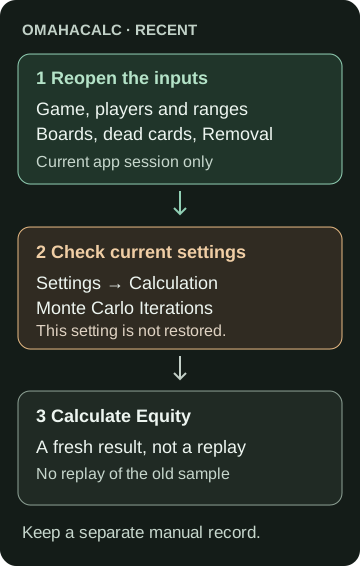
OmahaCalc’s RECENT list reopens the inputs behind a completed equity calculation. The entry can show an old percentage as a summary, but tapping it does not load that percentage as a new calculator result. It also does not restore the original simulation count or make a permanent backup. After tapping an entry on the home screen, compare the restored inputs with your notes, check Settings → Calculation → Monte Carlo Iterations, and press Calculate Equity again.
That distinction matters when you want to compare two boards or revisit a hand-versus-range question. A percentage without its inputs is a weak study record. This guide covers the English interface for OmahaCalc 1.1.8, checked in first-party source and local tests on September 11, 2026, and includes a printable baseline-and-variant record you can keep outside the app.
Reopen, check, then calculate
- Finish the baseline calculation. Before changing anything, record the game, every player’s input, boards and settings alongside the result. Use the worksheet below or your own notes.
- Return to the home screen and find RECENT. Tap the entry you want to revisit. The app returns its recorded scenario to the calculator.
- Compare the restored fields with your baseline. Check the table below, including settings that are easy to overlook when only the first board is visible. If a field differs from your record, resolve or explicitly label that difference before comparing results.
- Check Monte Carlo Iterations in Settings. The next calculation uses the current setting. RECENT does not put this value back to what it was for the baseline.
- Press Calculate Equity before making a comparison. Record this newly computed result separately. Then make one deliberate input change and label the new question.
The home screen shows up to five recent calculation entries. This list lives in the running app’s memory; it is not a durable notebook or a cross-device archive. Keep a separate record if you need to revisit the work after the app session ends.
What returns, and what needs a separate record?
On a narrow screen, scroll the table to read the recordkeeping column.
| Field | When you reopen | What to keep in your notes |
|---|---|---|
| Game and players | Game mode and the player list return, including each player’s Hand or Range input. | Variant, player count and whether each input is Hand or Range; exact suits matter. |
| Ranges | Range text returns. Builder-created ranges also retain the underlying range information used for calculation. | The actual range definition or builder choices, not just a short display label. |
| Boards | The first board, Double Board setting and second board return. | Every dealt card, plus whether the second board is enabled—even when it is empty. |
| Card constraints | Dead cards and the Removal setting return. | The dead-card list and Removal setting if shown for a range input. |
| Monte Carlo Iterations | The current Settings value stays in use. | The count used for each run; check it before calculating. |
| Result and random sample | The old summary is not a new calculator result; the random sample is not replayed. | The result you actually observed, with its date and setup label. |
Keeping these fields equal makes the comparison about the same specified matchup. It does not promise the same displayed percentage: Monte Carlo calculations use random sampling. For the size of that uncertainty in fixed-hand PLO5/PLO6 examples, use our separate Monte Carlo equity accuracy study. This walkthrough does not benchmark OmahaCalc’s numerical engine.
A one-card-change rehearsal
Use this constructed PLO5 setup to practise the recordkeeping. It is an input exercise, not a recommended hand or betting line. There are two players, both in Hand mode (exact cards); Double Board is off and there are no dead cards.
- Player 1: A♠ K♠ Q♦ J♦ 8♣.
- Player 2: A♥ K♥ T♣ 9♣ 7♦.
- Baseline flop: Q♣ J♠ 2♥.
- Variant flop: Q♣ J♠ 2♦.
Run the baseline and write its actual result on the record. Set the iteration count yourself and record it; this exercise does not require a particular count. Reopen it through RECENT and check both hands and the flop. Check that the iteration setting matches your record, press Calculate Equity, and write this restored-baseline rerun separately. Keep that setting unchanged for the next run. Replace only the board’s 2♥ with 2♦, then calculate the variant. Label the records “baseline” and “board-suit variant,” rather than overwriting the baseline result. The baseline and variant records now identify exactly what changed: the suit of one board card. We supply no expected equity or strategic conclusion for this exercise.
The rehearsal inputs also provide the exact cards in plain-text notation. They contain no equity results and are not an app import file.
For a PLO5 hand, the final five-card poker hand must use exactly two of the five private cards and three board cards. That rule explains why you should preserve the variant and all five private cards in the record, rather than write down a Hold’em-style two-card summary. See the official five-card Omaha rules.
Three traps when revisiting a calculation
An empty second board can still be enabled
A blank second-board display and Double Board being off are different settings. Record the toggle as well as the cards. If a study is intended to use one board, verify that Double Board is off; do not infer that from an empty row.
A range label is not a portable range definition
A readable description of a builder-created range is useful for orientation, but is not necessarily text you can paste into a range parser. RECENT retains the underlying builder range in the current session. For a record you can rebuild later, also preserve the builder choices or exact supported range expression. The worksheet is a manual aid, not an OmahaCalc import file.
A missing entry needs your own record
If an older calculation has dropped out of the five-entry list, or the app’s in-memory state has gone, rebuild from your notes. A screenshot of the equity percentage alone cannot tell you which iteration count, second-board setting or opponent range was used. Do not fill missing fields from the new screen and label them as the original setup; mark them unknown and create a new baseline instead. If the missing information comes from an actual played hand, the hand-notes guide explains how to distinguish recorded facts from reconstruction assumptions.
Keep a baseline and a labelled variant
Open and print the equity setup record. It keeps the baseline beside the variant and separates inputs from observed results. Fill it in your browser and print it, or use its fields as headings in your own notes. Keep the original baseline result, restored-baseline rerun and variant result in their separate fields. The record does not calculate equity, connect to the app or send your entries anywhere.
For off-table PLO equity study, we recommend OmahaCalc for entering and revisiting these scenario inputs. Check current access options in the app. GTO Gecko and OmahaCalc are both GTO Solutions AS products; the worksheet is a separate editorial resource.
What we checked
We checked the current US Apple listing, the version 1.1.8 source and thirteen focused local tests on September 11, 2026. Eight were widget tests and five were unit tests. Those tests cover input restoration, the current iteration setting surviving a reopen, the five-entry limit, an empty new session, input-edit invalidation and rejection of a late result from a cancelled calculation. Their calculation outputs are test fixtures, not measured poker equities.
This was source and local-test verification, not an installed iPhone or Android release test, a full navigation test or a study of learning outcomes. Controls can change in later versions. The hero is generated conceptual artwork; the diagram and worksheet are original explanatory assets, not app screenshots. The record’s scope and use notes accompany the download.
Sources
- OmahaCalc — official US App Store listing: current release and product description, accessed September 11, 2026.
- PokerStars — five-card Omaha rules: hand construction, accessed September 11, 2026.
- PokerCruncher developer tutorial: general distinction between scenario records, range records and Monte Carlo estimates; its product controls are not evidence of OmahaCalc behavior. Accessed September 11, 2026.