
GTO Gecko is a mobile poker solver and training app designed to help you study game theory optimal (GTO) poker strategy on your phone, tablet, or Mac. Unlike desktop-only solvers that require powerful hardware, GTO Gecko runs precomputed solutions instantly and includes a built-in solver, a hands-on trainer, performance statistics, and more — all in one app.
In this guide, we'll walk through every major feature so you know exactly what the app offers and how to use it to improve your game.
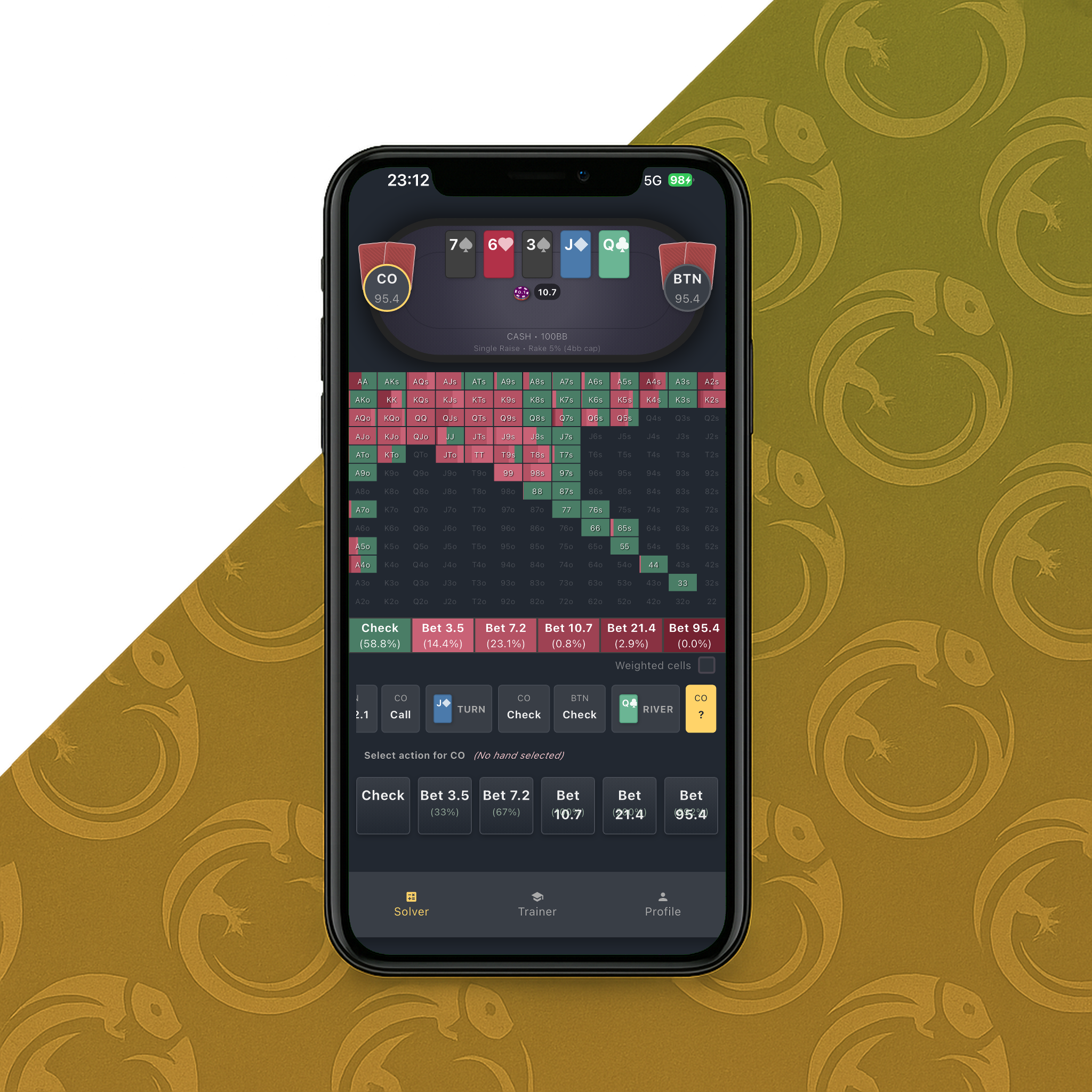
The Postflop Solver: Explore GTO Solutions for Any Spot
The postflop solver is the core feature of GTO Gecko. It lets you browse precomputed GTO solutions for thousands of poker scenarios — every common board texture, from flop through river, across multiple positions and stack depths.
How the Postflop Solver Works
When you open the solver, you select:
- Game type: Cash game, MTT (multi-table tournament), or Spins
- Preflop scenario: The action that led to the flop (e.g., button opens, big blind calls)
- Board: The community cards on the flop, turn, and river
The app instantly loads the full game tree for that scenario. You can navigate through every possible action — checks, bets, raises, calls, folds — and see exactly what the GTO strategy recommends for every hand in both players' ranges.
What You See in the Solver
For each decision point, the solver displays:
- Strategy frequencies: How often each hand should bet, check, raise, or fold
- Expected value (EV): The theoretical value of each action
- Range visualization: Color-coded grids showing the entire range strategy at a glance
- Bet sizing breakdowns: Multiple bet sizes with frequency and EV for each
Aggregated Reports
Beyond individual hands, the solver provides aggregated reports that show overall tendencies for the full range. This helps you identify patterns like how often the out-of-position player should check-raise on a given board texture, or what percentage of the in-position player's range bets large versus small.
These reports are invaluable for building generalizable takeaways you can apply across similar board textures. To learn how to read and interpret these outputs effectively, check out our guide on making sense of poker solver outputs.
Custom Solving: Analyze Your Own Hands
One of GTO Gecko's most powerful features is the built-in custom solver. This lets you set up any postflop scenario and solve it directly on your device — no desktop computer needed.
You define the board, ranges, pot size, stack sizes, and bet sizes, and the solver computes the GTO solution. The solver uses dynamic bet sizing based on the stack-to-pot ratio (SPR), automatically adjusting available bet sizes for realistic play.
Free Tier
The free tier keeps the preflop library open and lets you try the trainer, so you can test the app before subscribing for the full solver.
The Preflop Solver: Complete Ranges for Every Situation
The preflop solver covers every preflop situation you will encounter at the poker table:
- All positions: UTG, MP, CO, Button, Small Blind, Big Blind
- All action types: Opens (RFI), 3-bets, 4-bets, cold calls, squeezes
- Multiple stack depths: From short-stacked tournament play to deep-stacked cash games
- Game types: Cash game ranges, MTT ranges, and Spins ranges — each solved separately because the correct strategy differs based on format
The preflop ranges display exact frequencies for every hand, so you know not just which hands to play, but how often to take each action with mixed strategy hands. For a deeper look at how GTO range charts work, read our article on GTO range charts explained.
The Trainer: Practice GTO Decisions and Build Muscle Memory
Studying solutions is one thing. Training your decision-making under pressure is another. The GTO Gecko trainer is a hands-on practice mode that puts you in realistic poker scenarios and tests whether you make the GTO-correct play.
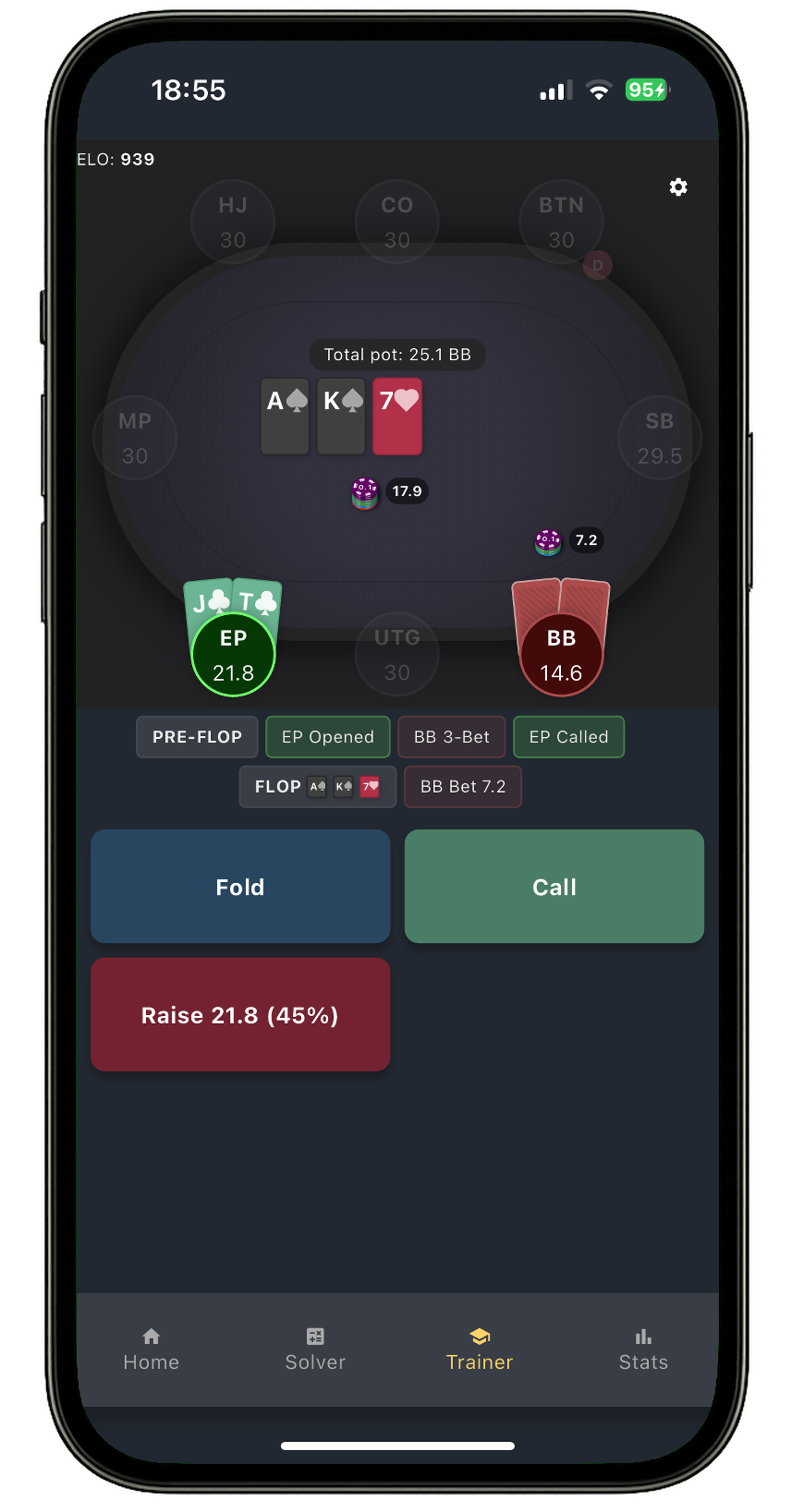
Postflop Trainer
The postflop trainer deals you random hands on random boards in common preflop scenarios. At each decision point, you choose your action — check, bet small, bet large, raise, fold — and the trainer tells you whether you matched the GTO strategy.
This builds pattern recognition and muscle memory so that correct decisions become automatic at the table. Understanding concepts like blockers and unblockers and betting patterns becomes second nature with consistent practice.
Preflop Trainer
The preflop trainer works the same way for preflop decisions. It puts you in various positions and scenarios and asks what you would do with your hand. It supports training across all game types (cash, MTT, spins) and lets you configure which scenarios to focus on.
Trainer Customization
You can customize the trainer to focus on the spots you struggle with the most. Select specific positions, game types, and action types to practice. This targeted approach is far more efficient than random practice.
Statistics and Performance Tracking
GTO Gecko tracks your training performance with a comprehensive statistics dashboard:
- Accuracy tracking: See your overall accuracy percentage and how it changes over time
- ELO rating system: A skill ranking that goes up when you make correct decisions and down when you make mistakes, giving you a concrete measure of your GTO knowledge
- EV loss analysis: See not just whether your decisions were wrong, but how much EV they cost you
- Mistake categorization: The app categorizes your mistakes by type (pure mistakes vs. frequency mistakes) and by spot (flop, turn, river)
- Hand strength analysis: See how you perform with different hand categories (strong hands, medium hands, bluffs)
- Positional breakdown: Track your accuracy by position and game situation
- Performance charts: Visual charts showing your accuracy and ELO over time

The statistics section turns training into a measurable process. Instead of vaguely hoping you're improving, you can track concrete numbers and identify exactly where your leaks are.
Achievement System
GTO Gecko includes an achievement system that rewards milestones in your training journey. Achievements unlock as you hit targets like completing a certain number of training hands, reaching ELO thresholds, or maintaining accuracy streaks.
This gamification element adds motivation to keep training consistently — which is the real key to improving at poker.
Game Type Support: Cash Games, MTTs, and Spins
Not all poker formats play the same. GTO Gecko solves and trains for three distinct game types:
- Cash games: Deep-stacked play with 100bb+ stacks and standard bet sizing
- MTT (tournaments): Various stack depths reflecting tournament stages, with ICM-adjusted strategies for later stages
- Spins (hyper-turbos): Short-stacked, fast-paced play with push/fold and short-stack strategies
Each game type has its own dedicated solutions and trainer mode, so you study the strategies that actually apply to the format you play.
Multi-Platform Support
GTO Gecko is available on:
- iOS (iPhone and iPad)
- Android (phones and tablets)
- macOS (Mac App Store)
Your subscription syncs across devices via account linking, so you can study on your phone during a commute and continue on your tablet or Mac at home.
40+ Languages Supported
The app supports over 40 languages, making it accessible to the global poker community. Whether you speak English, Spanish, Portuguese, Chinese, Japanese, Vietnamese, German, French, or dozens of other languages, you can use GTO Gecko in your native language.
Dark and Light Theme
The app offers both dark and light themes. The dark theme is popular for late-night study sessions and reduces eye strain during long practice sessions. You can switch themes from the settings page at any time.
Free Tier: What You Get Without Paying
GTO Gecko's free tier includes:
- Access to preflop ranges: Browse basic preflop solutions
- Trainer access: Practice GTO decisions in a limited number of scenarios
- Statistics tracking: Monitor your performance even on the free tier
The free tier lets you try the app risk-free before deciding whether to subscribe. No credit card required.
Pro Subscription: Unlock Everything
The Pro subscription unlocks the full library of solutions and unlimited training. You can subscribe per game type (cash game only, MTT only, or spins only) or get the Pro plan for access to everything.
Subscriptions are handled through the App Store (iOS/Mac) or Google Play (Android), with cross-device sync included.
How GTO Gecko Compares to Desktop Solvers
Desktop solvers like PioSolver and GTO Wizard are powerful tools, but they have limitations that GTO Gecko addresses:
| Feature | Desktop Solvers | GTO Gecko |
|---|---|---|
| Platform | Windows/Mac desktop only | iOS, Android, macOS |
| Solve time | Minutes to hours per solve | Instant (precomputed) + custom solver |
| Hardware needed | Powerful PC with lots of RAM | Any smartphone or tablet |
| Built-in trainer | Usually no | Yes — postflop and preflop |
| ELO/statistics | No | Yes — full performance tracking |
| Study anywhere | At your desk only | Phone, tablet, or Mac — anywhere |
GTO Gecko doesn't replace desktop solvers for advanced custom solving. Instead, it complements them by giving you a way to study and train anywhere, with instant access to thousands of precomputed solutions and a built-in trainer to test your knowledge. For a broader comparison, see our article on the best GTO apps and platforms.
Getting Started with GTO Gecko
Here's how to get the most out of the app as a new user:
- Download the app from the App Store or Google Play
- Start with the preflop ranges to make sure your preflop game is solid
- Move to the postflop solver and study common board textures in positions you play most often
- Use the trainer daily to build muscle memory and track your progress
- Review your statistics weekly to identify leaks and focus your study time
- Study the preflop library first to lock in a solid foundation across every position and format
Study Tip: Generalize, Don't Memorize
Don't try to memorize every solution. Instead, look for patterns across similar boards. For example, study how the solver's strategy changes on Ace-high boards across different positions, or how bet sizing shifts with different stack depths. These general concepts — like understanding what GTO poker really means — are what you'll actually use at the table.
Frequently Asked Questions
- Is GTO Gecko free to use?
- Yes. GTO Gecko has a free tier with unlimited preflop range browsing, trainer access, and statistics tracking. No credit card required.
- What platforms does GTO Gecko support?
- GTO Gecko is available on iOS (iPhone and iPad), Android, and macOS. Your subscription syncs across all devices.
- Does GTO Gecko work offline?
- Once solutions are downloaded, you can browse them offline. The trainer and custom solver require an internet connection for downloading new data.
- How is GTO Gecko different from PioSolver or GTO Wizard?
- GTO Gecko is a mobile-first app that provides instant access to precomputed GTO solutions plus a built-in trainer and ELO system. Desktop solvers are more flexible for custom analysis but require powerful hardware and don't include training modes.
- What game types does GTO Gecko cover?
- GTO Gecko covers cash games, MTTs (multi-table tournaments), and Spins (hyper-turbo sit-and-gos). Each format has dedicated solutions and trainer modes.
- How many languages does GTO Gecko support?
- Over 40 languages, including English, Spanish, Portuguese, Chinese, Japanese, Vietnamese, German, French, Korean, and many more.
- Can I use GTO Gecko for preflop and postflop study?
- Yes. The app includes both a full preflop solver with ranges for every position and scenario, and a postflop solver with thousands of board textures from flop through river.
- How does the ELO rating system work?
- Your ELO rating increases when you make correct GTO decisions in the trainer and decreases when you make mistakes. It's a skill-based ranking that gives you a concrete measure of how well you understand GTO strategy.
Start Improving Your Poker Game Today
Whether you're a tournament grinder, cash game regular, or spin-and-go specialist, GTO Gecko gives you the tools to study and train GTO strategy anywhere. Download the app, start with the free tier, and see how quickly your game improves when you have a structured study tool in your pocket.
Ready to level up? Download GTO Gecko on the App Store or Google Play.